Introduction
The pd-Edit module of Visual Transport Modeller provides the editing matrices functionality.
It is for designed use with transportation modelling trip matrices and its primary aim is to provide an easy to use, user-friendly manual trip matrix editor and converter. It uses windows with the matrix displayed in a dialogue box on the screen. This allows moving of the matrix as well as resizing. pd-Edit accepts most major transportation modelling suite matrices and allows conversion between all formats.
pd-Edit will accept matrices from the following proprietary suites : SATURN, QVIEW, TRIPS6, TRIPS7, MINITRAMP, ERICA (text and binary) and EMME2 and also o-d cell matrices.
It provides a simple and easy to use way of altering and amending trip matrices from the dumped ASCII version of the above proprietary modelling suites.
Test Matrices
The PdEdit directory in the test Data contains the following test matrices:
|
Filename |
Matrix Format |
Number of Zones |
|
JBSAT.DAT |
SATURN |
20 |
|
JBMINI.DAT |
MINITRAMP |
20 |
|
JBT6.DAT |
TRIPS6 |
20 |
|
JBT7.DAT |
TRIPS7 |
20 |
|
JBO.DAT |
OD-CELL |
20 |
|
JBQV.DAT |
QVIEW |
20 |
|
JBERICA.BMT |
BINARY ERICA - TRIPS |
20 |
|
JBERICA.TXT |
PRINTED ERICA - TRIPS |
20 |
|
JBEMME2.TXT |
EMME2 O-D CELL |
20 |
|
TEINPUT.TXT |
TRIP ENDS |
3 |
|
MXINPUT.TXT |
OD-CELL “ “ |
3 |
|
MXOUTPUT.TXT |
OD-CELL “ “ |
3 |
The market segment value in the ERICA matrix has been set to 1.
Opening an Existing Matrix File
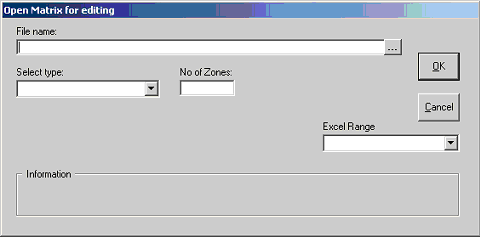
From the Matrices Menu, select Open and the following screen will be displayed:
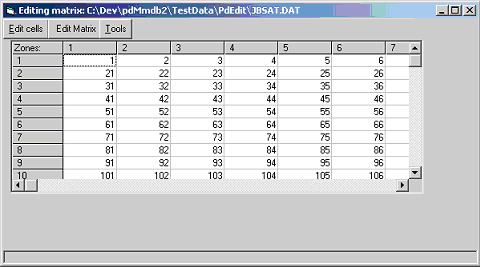
Browse to the JBSAT.DAT file in the TestData\PdEdit directory. Select Saturn as the type and enter 20 for the number of zones. Click OK and the matrix is displayed on a grid.
If the matrix being opened is an ERICA binary file, there are three options for the values displayed. Either the number of trips may be displayed or the variances associated with those trips or the number of observed trip records which gave rise to the grossed up trip value. This Binary ERICA - Records field will be empty in many matrices, depending on the program that generated the binary file. The same applies to the Variance field.
If Binary ERICA – Records, Binary ERICA - Trips or Binary ERICA - Variances are selected, then the Open Matrix for Editing form appears as below and two further pieces of information need to be entered. The first of these is the Market Segment that the user wishes to view and the second is the number of decimal places to be displayed in the cells. If no number of decimals is entered, then none will be displayed. For Records, the number of decimals is not needed.
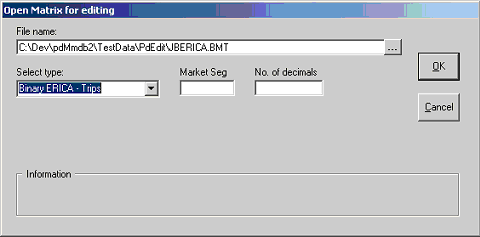
Note that when a Binary ERICA matrix is opened, it is not necessary to enter the number of zones in the matrix. For all other matrix types, this information is required.
To open an Excel file, any value greater than zero may be entered in the No. of Zones text box. The program will request the number of rows in the file followed by the number of columns. This means that data can be displayed that is not a matrix. To open a matrix, the number of zones must be entered as both the number of rows and the number of columns. The range name must be entered in the Excel Range drop down box and if no range name is entered, the software will look by default for a range called Matrix. The range must include a blank line or line of headings immediately above the data.
Saving the file to a new format
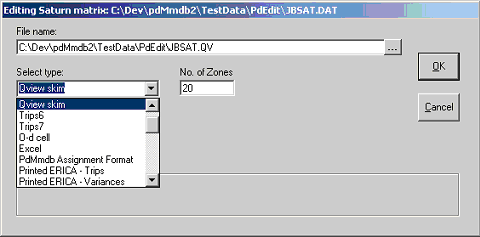
Once the file is opened, it can be saved to a new format from the Matrices Menu by selecting File and then Save As. This will produce a screen requiring the user to input a filename as before and a matrix format (the same options as for opening a matrix). In the example shown the SAVE AS filename contains information on the matrix format both before and after conversion (i.e. JBSAT.DAT becomes JBSAT.QV on conversion from SATURN to QVIEW). The user then selects OK and pd-EDIT will produce an ASCII file in the required format. As the matrices are shown in spreadsheet format on screen the change in the format will not be readily noticed.
If the name entered for the new matrix is the name of an existing file, that file will be overwritten. If the new matrix is to be a binary or printed ERICA matrix, clicking the OK button will cause a message to be displayed requesting a market segment number. This market segment number will then be written into the new matrix.
Creating a New Matrix
To create a new matrix in pdEdit select New Matrix after selecting File from the Matrices menu. The resultant screen display is similar to that for opening an existing file in that it requests the user to input a filename, matrix type and the number of zones, but in this case it also has the option for specifying a value with which to seed all cells in the newly created matrix i.e. the Fill with cell value box. The screen displayed should look like that below:
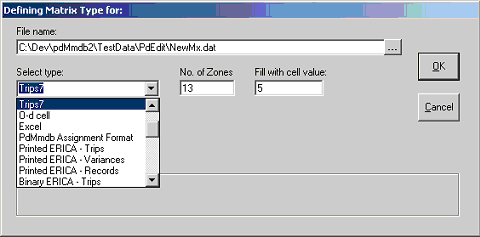
Having supplied the information required by the program, pdEdit will construct a new matrix with 13 zones where every cell has a value of 5. As an alternative the FILL WITH CELL VALUE box can be left blank, in which case each cell is left empty and values can be input via the editor separately.
The file should then be saved via the SAVE AS command to the specified format. If the user specifies CLOSE before saving he/she will be prompted, “You have changed your matrix. Do you want to save your edits before quitting?”
File Types
Pd-EDIT can open many different types of matrix. Further notes on some of these formats follow.
Pd-EDIT can open two different types of O-D cell matrix. The O-d Cell option is for files that have only the origin zone, destination zone and number of trips in each record. The EMME2 O-d Cell option is for opening the text files used by the EMME2 program. These have a colon between the destination zone and the number of trips and not a space. It is important to select the correct option when opening an O-D cell matrix. The EMME2 files must have only one O-D pair per row if the EMME2 O-D Cell option is chosen. If there are three cells per row the EMME2 3 Zone option must be chosen to read the matrix. If there are four cells per row the EMME2 4 Zone option must be chosen. If there are five cells per row the EMME2 5 Zone option must be chosen.
Binary ERICA Matrices can contain as many as three values per record that may be of interest. These are the number of trips, the variance associated with it and a third value called records. This is the number of trip records from which the Trips value was derived i.e. before whatever data processing and grossing up resulted in the Trips value. Selection of Binary ERICA Trips, Variances or Records determines which values are displayed.
Printed ERICA Matrices display all the values in the binary ERICA file. They have one O-D pair value per row, which is duplicated for each Market Segment. The first field is the Market Segment, followed by the origin zone and then the destination zone. The following two fields normally contain just ones and are of no significance. The final three columns are the Records, Trips and Variances.
Printed CMT Matrices are the text ERICA matrices produced from binary ERICA matrices by the Census Matrix Tools program. They are the same as the ERICA text matrices described above except that they omit the two redundant columns with ones in. The correct option must be chosen when opening one of these two file types. Pd-EDIT will not create Printed CMT Matrices as Printed ERICA Matrix is the normal format. A message recommending Printed ERICA Matrix will appear if an attempt is made to save a matrix in Printed CMT format.